
Your SaaS site gets visitors, but the signups stay low. It feels like something is broken, and you can’t see what.
A CRO audit checklist is a list of checks that helps you find friction, spot where people drop off, and rank the fixes before you run any A/B tests.
This one has 37 checks in 7 stages. Each check scores 0, 1 or 2 points.
You add up your score, find the weak stage, and fix that first.
If you would rather hand it off, you can get a SaaS CRO audit done for you.
What the checklist covers
- Goals and tracking. Does GA4 count your main conversion the right way?
- Funnel and analytics. Which step loses the most people?
- Technical and performance. Is anything slow, broken or buggy?
- Messaging and trust. Does the page speak to the visitor’s problem in plain words?
- UX, forms and CTAs. Does the form calm the worry and make the next step obvious?
- Research. What do recordings and real users show you?
- After the signup. Do new users reach their first win?
Most teams skip this work and guess.
They change a button color, rewrite the hero, or redesign the pricing page because it “feels off.”
Weeks later, the numbers look the same, and nobody knows why.
An audit replaces the guessing with evidence. You stop fixing what looks wrong and start fixing what costs you signups.
The process
- Score. Give each of the 37 checks a 0, 1 or 2.
- Fix. Start with the weakest stage, then work down your list.
- Test. Check every change against real behavior before you trust it.
What a CRO Audit Checks and How It Differs From a Landing Page Review
A CRO audit is a structured review of your whole funnel, from the first visit to the paid plan, that finds where people stop and ranks the fixes by impact.
It combines your analytics, your pages, and what real users say.
A landing page review looks at one page. A UX audit looks at how easy the site is to use.
| Type | What it looks at | Data it uses | What you get |
|---|---|---|---|
| CRO audit | The whole funnel, from ad click to paid plan | Analytics, page review, recordings, user research | A ranked list of fixes and test ideas |
| UX audit | How easy the site is to use | Usability review and user tests | A list of usability problems |
| Landing page checklist | One page, top to bottom | The page itself | A scored page and a fix list for that page |
If you only need to fix one page, use the landing page optimization checklist instead.
Before You Start the CRO Audit
Decide how deep you can go before you open a single report.
Your traffic decides which methods give you real answers.
Choose a 1-Day Audit or a 2- to 4 Week Audit
A small SaaS with a few hundred visitors a month can’t run a big survey. A bigger SaaS can, and should.
When I audit a smaller SaaS site, I keep heatmaps, session recordings, user tests and a handful of customer interviews. I hold the surveys.
Surveys need hundreds of answers before you can trust them. Five interviews can already give you a clear picture.
| Method | Works with low traffic | How many you need |
|---|---|---|
| Heatmaps and session recordings | Yes | Enough sessions on your key pages to spot a pattern |
| User tests | Yes | About 5 people per round |
| Customer interviews | Yes | A few good ones |
| On-site and email surveys | Not really | Hundreds of answers |
| A/B tests | No | Enough traffic to reach a reliable result |
The user test number comes from Nielsen Norman Group. Their guide says the best results come from testing no more than 5 users and running as many small tests as you can afford.
The 1-day version. Stages 1 to 5, plus a quick look at recordings.
The 2 to 4 week version. Everything above, plus interviews, user tests, and, if you have the traffic, surveys.
Know When a CRO Audit Is the Wrong Next Step
When the page is not the problem
- The offer doesn’t fit. If buyers don’t want what you sell at that price, page fixes won’t help.
- A rebuild is coming. Run the research parts, but skip fixes on pages that will disappear.
- Almost no traffic. Funnel data won’t show a pattern, so lean on interviews and user tests.
In the first case, talk to customers before you touch a page.
The CRO Audit Checklist in 7 Stages
Work through the stages in order, and score each check 0, 1 or 2 in the sheet.
A 0 fails, a 1 partly works, and a 2 passes.
- Goals and tracking. Check that your data tells the truth.
- Funnel and analytics. Find where people leave.
- Technical and performance. Fix what is slow or broken.
- Messaging and trust. Make the page about the visitor.
- UX, forms and CTAs. Calm the worry at the form.
- Research. Watch real behavior and ask real users.
- After the signup. Guide new users to their first win.
One habit makes the whole audit work.
I read the page and GA4 side by side, not one after the other.
My eyes tell me what the page says. The data tells me what visitors do with it.
Stage 1, Goals and Tracking
Start by checking that your data tells the truth, because every later stage depends on it.
If GA4 counts the wrong thing, every conclusion you draw from it will be wrong too.
What to check
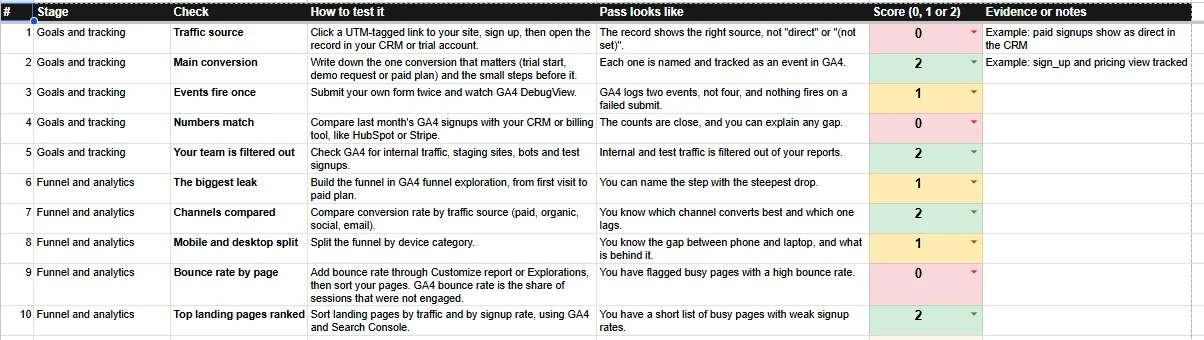
- Traffic source. One UTM-tagged visit should reach your CRM with its source, not as “direct” or “(not set).”
- Main conversion. Name the one that matters, like a trial start or demo request, and the small steps before it.
- Events fire once. Submit your own form twice and confirm GA4 logs two events, not four.
- Numbers match. Compare GA4 signups with your CRM or billing tool, like HubSpot or Stripe.
- Your team is filtered out. Remove internal traffic, staging sites, bots and test signups.
I run the source check first.I can’t tell which channel converts if the source is wrong.
GA4 has recommended events for the signup step. Google describes sign_up as the event for when a user signs up for an account.
It describes generate_lead as the event for when a lead comes in through a form.
Stage 2, Funnel and Analytics
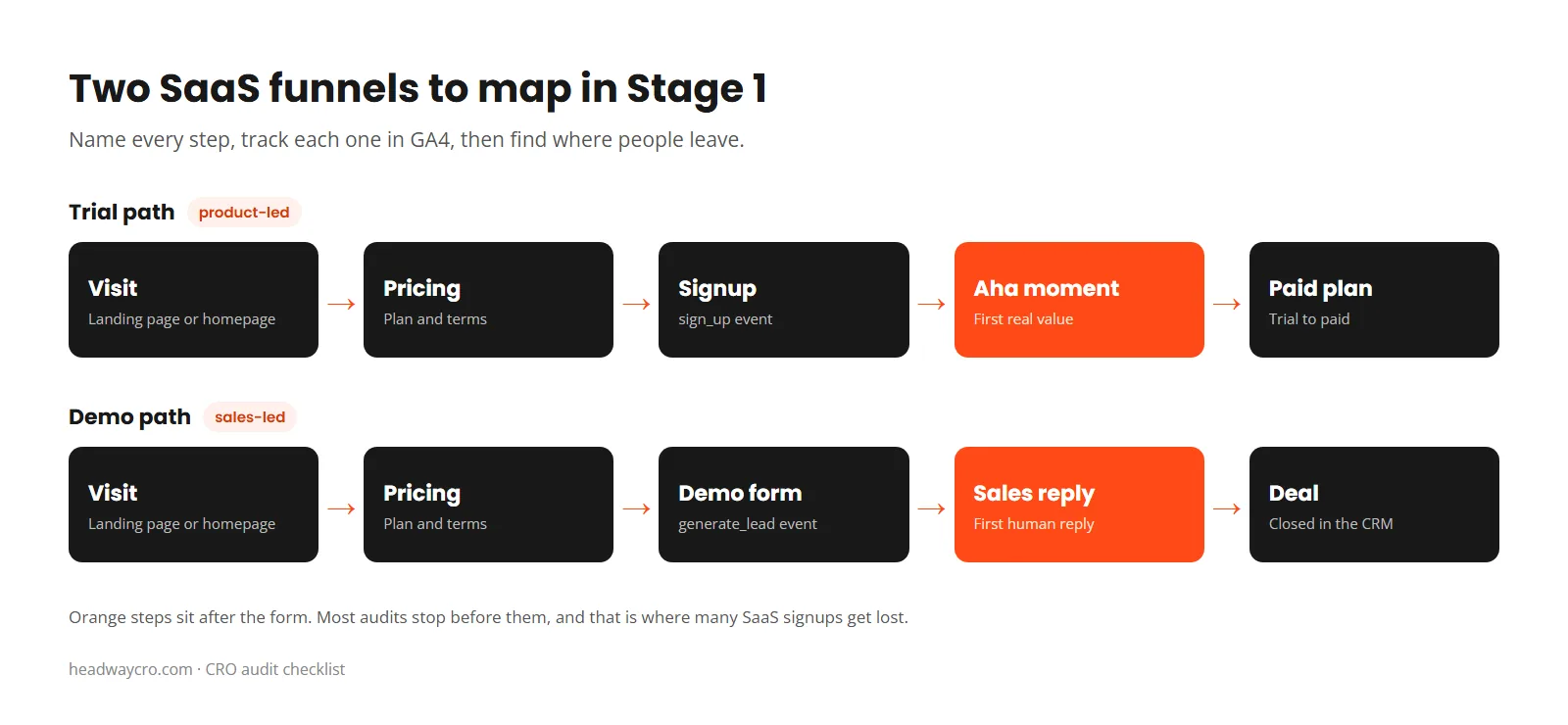
Map every step from first visit to paid plan, then find the step where the most people leave.
GA4’s funnel exploration shows this in one view.
What to check
- The biggest leak. Build the funnel in GA4 and find the step with the steepest drop.
- Channels compared. See which traffic source converts best and which ones lag behind.
- Mobile and desktop split. A page can work on a laptop and fail on a phone.
- Bounce rate by page. Find the pages where the most visits end without engagement.
- Top landing pages ranked. Sort by traffic and by signup rate, and start with the busiest weak page.
GA4 still has bounce rate, but it hides it from the default reports.
Google defines it as the share of sessions that were not engaged. A session counts as engaged when it lasts longer than 10 seconds, has a key event, or has 2 or more page views.
Add the metric through Customize report or Explorations.
Pro Tip. A big drop on a tiny step matters less than a small drop on a busy one.
When the page looks fine to me but GA4 says something is wrong, I believe GA4.
Unless the tracking is broken. That is why Stage 1 comes first.
No single number tells the whole story either. I look at several data points together before I decide anything.
Stage 3, Technical and Performance
Make sure nothing slow, broken or buggy stops people before your copy gets a chance.
These problems are often the easiest to fix.
What to check
- Pages load fast. Check Core Web Vitals in PageSpeed Insights or the Search Console report.
- The flow works everywhere. Run your signup or demo flow on the top browsers and devices, worst converters first.
- Forms behave. Submit one with a mistake on purpose, and the error should name the field and the fix.
- Nothing is broken. Look for broken links, missing images and script errors.
- Confirmation works. After a real submit, the thank-you page should show and the welcome email should arrive.
Google’s web.dev sets the “good” line at three numbers. Largest Contentful Paint (LCP) within 2.5 seconds, Interaction to Next Paint (INP) of 200 milliseconds or less, and Cumulative Layout Shift (CLS) of 0.1 or less.
It measures these at the 75th percentile of page loads, split by mobile and desktop.
Heads Up. Chat widgets and calendar embeds often slow a page or break on mobile.
Stage 4, Messaging and Trust
Check that the page talks about the visitor’s problem in plain words, not about the company in clever ones.
This is the most common messaging problem I see on SaaS sites.
Companies make the page about themselves. They chase clever headlines and catchy titles that sound like marketing.
Visitors don’t want that.
They want to read the headline and feel they are in the right place, and that their problem will get solved.
What to check
- About the customer. Sentences about the reader’s problem should outnumber sentences about “we” and “our platform.”
- Clear, not clever. Show the page for five seconds, hide it, and ask what the product does and who it’s for.
- Customer words. The headline should use the exact words customers use in reviews, calls and interviews.
- Message match. The headline should repeat the promise from the ad, email or search result.
- Plain pricing and terms. Plans, trial length, cancellation and billing should be easy to follow.
- Proof next to claims. Put logos, G2 or Capterra ratings and named case studies beside the claims they support.
I don’t trust my own read of a headline alone.
I compare it with customer words first, then I run a user test with real people.
The conversion copywriting guide shows how to collect those words.
Good to Know. B2B buyers also look for security and privacy signs, like SOC 2 or GDPR notes.
Unclear terms work like hidden shipping costs in a shop.
Stage 5, UX, Forms and CTAs
Treat the signup or demo form as the most anxious moment on your site, and remove every reason to stop there.
Most SaaS sites show a plain form with a Submit button and nothing else.
That leaves the visitor alone at the exact moment they feel the most risk.
What to check
- Risk reversal. Put the worry-removers next to the button, like “No credit card needed” or “Cancel anytime.”
- Next step stated. Tell people what happens after they click.
- Gain in the button. “Start my free 14-day trial” beats “Submit” because it names what they get.
- Only needed fields. Cut any field that no person or system uses.
- One main CTA. Give each page one clear next step, easy to tap on a phone.
- Fast navigation. Visitors should reach pricing, the tour, integrations and proof in one or two clicks.
A form that asks for value-framed action works better than one that asks for a bare action.
For the full page-by-page list, use the landing page checklist linked above.
Stage 6, Research
Watch what real people do on your pages, then ask them why.
Analytics shows you where people leave. Recordings and conversations show you the reason.
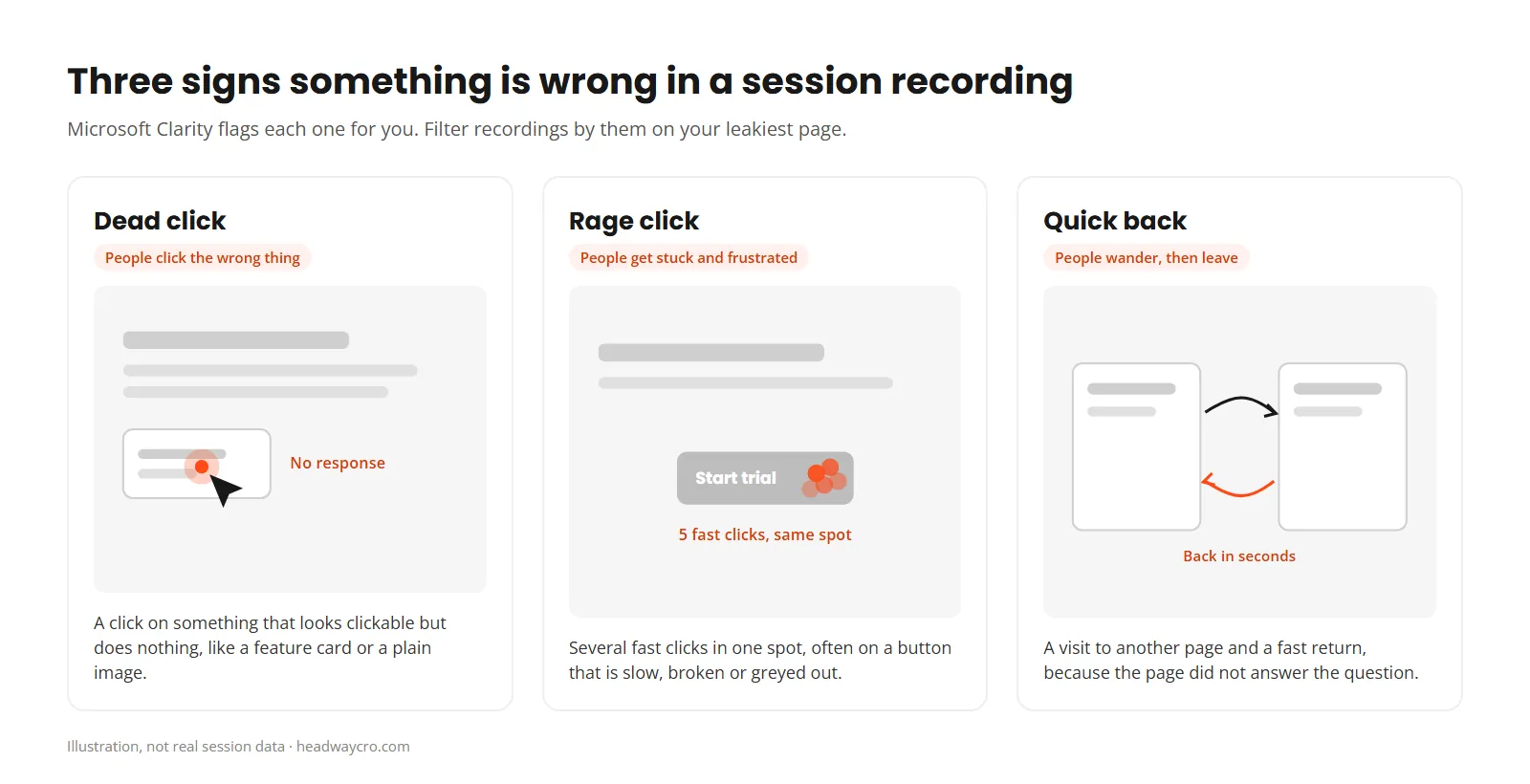
When I watch session recordings, three signs tell me something is wrong.
- People wander. The cursor moves around and nobody clicks, because they can’t find the next step.
- People click the wrong thing. They click text that isn’t a link, or the wrong link.
- People leave. After wandering, they close the tab.
Microsoft Clarity flags these for you for free.
It marks a dead click when someone clicks an element and gets no response in a reasonable time. A rage click is several fast clicks on the same spot.
A quick back is when someone leaves a page and returns faster than usual, which tells you the page didn’t help.
What to check
- Recordings filtered. Watch sessions from the leakiest step, not random ones.
- Heatmaps read. Check scroll depth on pricing and signup pages to see what people miss.
- Customer words gathered. Read support tickets, sales call notes and G2 reviews for repeat objections.
- Five user tests. Ask people who match your buyer to do one core task, and don’t help them.
- A few interviews. Ask recent signups what almost stopped them and what else they tried first.
Stage 7, After the Signup
Keep auditing after the form, because a signup is not a customer yet.
In SaaS, the money comes when a trial user becomes a paying user.
I check two things first.
- Reinforce the decision. The thank-you page and welcome email should tell new users they made the right choice.
- Find the aha moment. Shape onboarding so new users reach their first real value as fast as possible.
Reinforcing the decision means the same message, the same tone and the same mindset as the page that convinced them to sign up.
The aha moment is where users first feel the product’s real value. Everything in onboarding should point toward it.
What else to check
- Emails lead somewhere. Each onboarding email should push one useful action, not tour every feature.
- Trial-to-paid drop. Find where trial users stop before paying, like the upgrade page or card step.
- Fast demo replies. Time the gap from form submit to the first human reply, including nights and weekends.
How to Prioritize CRO Audit Findings
Sort every finding into one of three groups, then score the ones you plan to test.
- Fix now. Bugs, broken tracking and clear usability failures, because testing these wastes traffic.
- Test. Big changes where the right answer isn’t obvious, on pages with enough traffic.
- Research more. Problems you can see but can’t explain yet.
Two scoring models work well for the test group.
| Model | How it scores | Best for | Weak spot |
|---|---|---|---|
| ICE | Impact, confidence and ease, each from 1 to 10 | Small teams that need a fast ranking | Easy to inflate scores you like |
| PXL | Mostly yes or no answers. CXL scores most items 0 or 1 and adds weight for how noticeable the change is, adding or removing elements, and ease of building it | Teams with research data behind each idea | Takes longer to set up |
A finding also needs evidence.
Weak. Move the testimonials higher on the pricing page.
Strong. Sales calls show buyers worry about setup time, and recordings show most visitors never scroll to the testimonials.
Placing a short setup quote next to the plan buttons could lift trial starts.
The strong version links a real customer worry to a change and a number you can measure.
CRO Audit Tools You Can Use for Free
You can run most of this audit with free tools.
The hard part is judging the evidence, not paying for software.
| Tool | Stage | What it shows |
|---|---|---|
| Google Analytics 4 | 1 and 2 | Funnels, channels, devices, bounce rate, events |
| Google Tag Manager | 1 | Whether your tags fire at the right moment |
| Google Search Console | 2 and 3 | Top landing pages from search and Core Web Vitals |
| PageSpeed Insights | 3 | Page speed on mobile and desktop |
| Microsoft Clarity | 6 | Recordings, heatmaps, dead clicks, rage clicks, quick backs |
| Hotjar (free plan) | 6 | Heatmaps, recordings and short on-page polls |
| Google Forms or Typeform | 6 | Customer surveys |
| G2 and Capterra | 4 and 6 | Customer words, objections and praise |
| AI assistants like ChatGPT or Claude | 4 and 6 | Grouping review quotes and call notes into themes, fast |
Heads Up. AI can sort customer quotes in minutes, but it can’t tell you which finding matters most.
Use the Free CRO Audit Template to Score Your Site
Copy the free sheet, score all 37 checks, and it builds your fix list for you.
No email needed.
How to use it
- Copy. Open the sheet and click “Make a copy.”
- Score. Give each check a 0, 1 or 2.
- Prove. Add the evidence for each score, like a screenshot or a GA4 number.
- Sort. Open the Fix list tab, which sorts every 0 and 1 by stage.
- Fix. Repair broken tracking first, then work down the list.
Avoid These Common CRO Audit Mistakes
Most audits fail because they turn opinions into findings, not because they miss a check.
- Opinions as findings. “The button should be bigger” is a guess, while a finding points to data, a recording or a quote.
- Skipping the tracking check. You can spend weeks on analysis and then learn a key step was never tracked.
- Treating every page the same. Start with the pages that carry the most traffic and signups.
- Calling everything high priority. If 40 problems are all urgent, nothing is.
- Stopping at the signup. The trial-to-paid step often hides the biggest loss.
- A report nobody acts on. The audit is done when the top fixes ship, not when the report arrives.
How Often to Run a CRO Audit
Run a full audit about once a year, and check tracking and the after-signup flow more often.
A plugin update or a renamed CRM field can quietly break tracking at any time.
Also run one after
- A redesign. A new site changes every page and every event.
- A pricing change. New plans change how people move through the funnel.
- A sudden drop. Signups or trial-to-paid fall and you don’t know why.
Run the Audit, Then Fix What the Data Shows
A good CRO audit doesn’t hand you a list of opinions. It shows you where people leave, why they leave, and what to fix first.
Check your tracking before you trust a single number.
Read the page and the data together. Write for the customer, not the company.
Calm the worry at the form. Then keep going after the signup, because that is where a visitor finally becomes a customer.
Your eyes can tell you what looks wrong. Only the audit tells you what actually costs you signups.
CRO audit checklist FAQ
What a CRO Audit Is
A CRO audit is a structured review of your website and funnel that finds where visitors stop before converting.
It uses analytics, a page review, behavior data like recordings, and customer research. The result is a ranked list of fixes and test ideas.
What a CRO Audit Checklist Should Include
A good CRO audit checklist covers goals and tracking, funnel analysis, technical health, messaging and trust, forms and CTAs, and user research.
For SaaS, it should also cover what happens after the signup, like onboarding and the move from trial to paid.
How Long a CRO Audit Takes
A quick audit of the main stages takes about one day.
A full audit with interviews, user tests and surveys usually takes two to four weeks, because the research needs time to collect answers.
Doing a CRO Audit Yourself
You can run a CRO audit yourself with free tools like GA4, Microsoft Clarity, PageSpeed Insights and a few user tests.
The hardest part is judging the evidence without bias, because you know your own site too well.
The Difference Between a CRO Audit and a UX Audit
A UX audit checks how easy your site is to use.
A CRO audit includes usability but also covers tracking, traffic sources, messaging and what happens after signup. It ranks every finding by its effect on conversions.
Using AI for a CRO Audit
AI tools help you sort reviews, call notes, and survey answers into themes quickly. They can also draft test ideas.
They can’t replace your judgment on which problems matter most, so check every suggestion against your data.